

Introduction
Artificial intelligence is moving from simple chatbots toward AI systems that can access data, use tools, interact with applications, and complete tasks.
But there is a major challenge: AI applications need a consistent way to connect with external tools and data sources.
An AI assistant may need access to a database, GitHub repository, cloud storage, company documentation, APIs, business applications, or development tools. Without a common standard, developers often have to build and maintain separate integrations for each AI application and each external system.
This is where MCP, or Model Context Protocol, comes in.
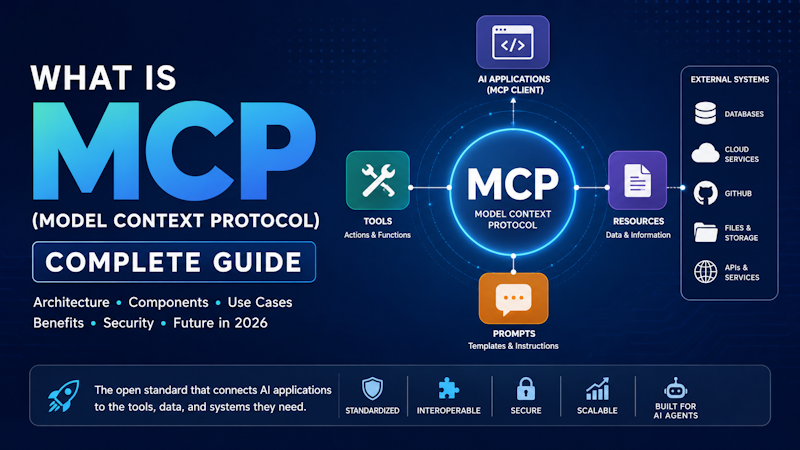
MCP is an open standard designed to provide a standardized way for AI applications to connect to external data sources and tools. Anthropic describes it as similar to a USB-C connection for AI applications because it provides a common interface between AI systems and external capabilities.
In this guide, we'll explain what MCP is, how MCP works, MCP clients and servers, MCP tools and resources, MCP architecture, real-world use cases, benefits, security considerations, and why MCP is becoming important for AI agents in 2026.
What Is MCP (Model Context Protocol)?
MCP stands for Model Context Protocol.
It is an open protocol that standardizes how AI applications connect to external tools, data sources, and services.
In simple terms:
MCP gives AI applications a standardized way to discover and use external capabilities.
For example, imagine an AI coding assistant that needs to:
- Read files from a project
- Search a GitHub repository
- Query a database
- Check application logs
- Create an issue
- Retrieve information from documentation
- Call an external API
Without a common protocol, each integration may require custom development.
With MCP, an AI application can connect to MCP-compatible servers that expose those capabilities in a standardized format.
This makes MCP particularly useful for modern AI agents and agentic AI systems, which increasingly need to interact with external systems rather than simply generate text.
For a broader explanation of AI agents and how they work, see our guide on [AI Agents in 2026: Complete Guide to Agentic AI].
Why Was MCP Created?
Large language models are powerful, but a model by itself does not automatically have access to your private business systems.
For example, an AI model may not know:
- What is stored in your company's database
- What files are in your internal document repository
- What issues exist in your GitHub project
- What today's sales figures are
- What is happening in your production environment
- What information is stored in your CRM
Developers can build custom integrations for these systems, but this approach becomes difficult to maintain as the number of tools increases.
MCP addresses this integration problem by establishing a common protocol.
Instead of building:
AI application → Custom GitHub integration

AI application → Custom database integration

AI application → Custom file integration

AI application → Custom API integration
you can build MCP-compatible connections:
AI application → MCP → GitHub

AI application → MCP → Database

AI application → MCP → Files

AI application → MCP → APIs
The goal is not to replace APIs or databases. Instead, MCP provides a standardized layer through which AI applications can interact with those systems.
How Does MCP Work?
At a high level, an MCP system contains an AI application or host, an MCP client, and one or more MCP servers.
A simplified architecture looks like this:
                    AI Application
                          |
                    MCP Client
                          |
                 Model Context Protocol
                          |
        -------------------------------------
        |                 |                 |
    MCP Server        MCP Server        MCP Server
        |                 |                 |
    GitHub            Database          Files/API
The AI application uses an MCP client to communicate with MCP servers.
An MCP server exposes capabilities that the AI application can use.
For example, a GitHub MCP server might provide tools for searching repositories or retrieving issues.
A database MCP server might provide tools for querying approved data.
A file-system MCP server might provide access to permitted files.
The AI model can then decide which available capability is appropriate for the task, subject to the application's permissions and safeguards.
MCP Client vs MCP Server
Understanding the difference between an MCP client and an MCP server is essential.
What Is an MCP Client?
An MCP client is the component inside an AI application that communicates with MCP servers.
The client manages the connection and communication between the AI application and the MCP server.
Examples of applications that can act as MCP hosts or use MCP include AI coding environments and other AI applications.
The MCP TypeScript SDK documentation describes MCP as a standard through which AI applications connect to systems where data and tools live.
What Is an MCP Server?
An MCP server exposes capabilities to an MCP client.
Despite the name, an MCP server does not necessarily have to be a large remote server.
An MCP server can expose:
- Tools
- Resources
- Prompts
- Data
- Application capabilities
For example, an MCP server could provide a controlled interface to a PostgreSQL database.
The AI application does not need to understand the internal implementation of the database. It communicates with the MCP server through the protocol.
What Are MCP Tools?
MCP tools allow an AI application to perform actions or retrieve information through an MCP server.
For example, an MCP server might expose tools such as:
search_documents()
get_customer()
query_database()
search_repository()
create_issue()
get_weather()
The exact tools depend on what the MCP server is designed to provide.
This is particularly important for AI agents.
An AI agent may reason:
User Request
     ↓
Understand Goal
     ↓
Choose Tool
     ↓
Call MCP Tool
     ↓
Receive Result
     ↓
Reason About Result
     ↓
Choose Next Action
This tool-based interaction allows an AI system to move beyond simply generating an answer.
What Are MCP Resources?
MCP also supports resources, which represent information that an AI application can access through an MCP server.
Resources can be used for things such as:
- Documents
- Files
- Database information
- Application data
- Documentation
- Other contextual information
The important distinction is that tools are generally used for actions, while resources provide information or context.
For example:
Resource:
company://policies/security
An AI application could retrieve the relevant security policy as context.
Tool:
create_support_ticket()
The AI application could use the tool to act.
MCP Prompts
MCP can also expose reusable prompts.
Prompts can help applications provide structured instructions or predefined interaction patterns.
For example, an MCP server could provide prompts for:
- Code review
- Customer support analysis
- Database analysis
- Security investigation
- Documentation generation
This allows applications to expose more than just raw data or functions.
MCP Architecture Explained
A simplified MCP architecture can be represented as:
User
  |
  ↓
AI Application / Host
  |
  ↓
AI Model
  |
  ↓
MCP Client
  |
  ↓
MCP Server
  |
  ├── Tools
  ├── Resources
  └── Prompts
  |
  ↓
External System
  |
  ├── Database
  ├── API
  ├── GitHub
  ├── Files
  └── Business Application
The AI model determines what information or capability it needs, while the MCP layer provides a standardized mechanism for accessing the available capabilities.
This separation can make AI integrations easier to develop and maintain.
MCP vs Traditional API Integration
MCP does not mean that traditional APIs are becoming obsolete.
Instead, MCP can sit between AI applications and existing systems.
Consider a traditional application:
Application → REST API → Database
With MCP, an AI application might interact with an MCP server:
AI Application → MCP → MCP Server → REST API → Database
The MCP server can provide AI-friendly tools and resources while hiding implementation details.
This can be particularly useful when an organization has many existing systems but wants AI agents to interact with them in a controlled way.
MCP and AI Agents
MCP becomes especially interesting when combined with AI agents.
An AI agent needs more than a language model.
It often needs:
- Context
- Tools
- Data
- APIs
- Memory
- Planning
- Execution
- Permissions
- Feedback
MCP can provide a standardized mechanism for connecting agents to some of these external capabilities.
For example, imagine an AI software development agent.
The developer asks:
"Investigate why the latest deployment failed and create a fix."
The agent could potentially:
- Search the GitHub repository.
- Retrieve recent commits.
- Access deployment information.
- Read approved logs.
- Identify the likely problem.
- Modify the code.
- Run tests.
- Create a pull request.
- Ask for human approval before deployment.
MCP can provide standardized connections to the tools and systems required for those steps.
This is one reason MCP is closely connected with the growth of agentic AI.
For more information, read our [What Are AI Agents? A Complete Beginner's Guide].
MCP Use Cases
MCP can be useful in many AI applications.
1. Software Development
Developers can connect AI coding assistants to:
- GitHub
- Git repositories
- Databases
- Documentation
- Issue trackers
- Local files
- CI/CD systems
- Monitoring tools
This allows an AI assistant or coding agent to work with real development environments instead of relying only on information included in a prompt.
2. Database Access
MCP can provide controlled access to databases.
For example:
AI Assistant
     ↓
MCP Client
     ↓
Database MCP Server
     ↓
PostgreSQL
The MCP server can expose approved database operations instead of giving an AI unrestricted database access.
3. Enterprise Knowledge
Organizations can connect AI applications with:
- Internal documentation
- Knowledge bases
- Policies
- Product information
- Customer information
- Business systems
This can help AI systems provide answers based on current organizational information.
4. Customer Support
An AI support agent could potentially connect to:
- CRM systems
- Order databases
- Knowledge bases
- Ticketing platforms
- Product documentation
Instead of simply suggesting an answer, the agent could retrieve relevant information and perform authorized actions.
5. Data Analysis
An AI data analyst could use MCP-connected tools to:
- Query approved datasets
- Retrieve reports
- Analyze information
- Generate summaries
- Compare business metrics
Appropriate permissions and validation remain important, especially when sensitive business data is involved.
6. DevOps and Cloud Operations
MCP can also be used to expose controlled operational capabilities.
For example, an AI operations assistant might access:
- Application logs
- Monitoring systems
- Deployment information
- Cloud resources
- Incident management systems
High-risk operations should require appropriate authorization or human approval.
What Are the Benefits of MCP?
Standardized AI Integrations
One of MCP's biggest advantages is standardization.
Developers can use a common protocol rather than creating completely different integration approaches for every AI application.
Reusable Connections
An MCP server can potentially be used by multiple compatible AI applications.
This can reduce duplicated integration work.
Better Tool Access for AI
AI systems become more useful when they can access relevant external information and tools.
MCP provides a standardized mechanism for exposing these capabilities.
Easier AI Agent Development
AI agents frequently need multiple tools.
MCP can provide a consistent way for agents to discover and interact with those tools.
Separation Between AI and Backend Systems
The MCP server can act as an abstraction layer between an AI application and the underlying system.
This can make it easier to control what the AI can access.
MCP Security: What Developers Need to Know
MCP can provide powerful capabilities to AI applications, which also makes security extremely important.
Giving an AI system access to a database, file system, GitHub repository, or business application introduces potential risks.
Developers should consider:
Least-Privilege Access
Only provide the permissions the AI actually needs.
An AI assistant that only needs to read documentation should not automatically receive permission to modify production systems.
Authentication and Authorization
Remote MCP deployments should use appropriate authentication and authorization mechanisms.
The current MCP specification has continued to strengthen its authorization model. The July 28, 2026 specification includes authorization hardening and changes around modern authorization deployments.
Validate Tool Inputs
MCP tools should validate input carefully.
For example, a database tool should not blindly execute arbitrary operations simply because an AI model requested them.
Human Approval for High-Risk Actions
Actions such as:
- Deleting data
- Sending payments
- Modifying production infrastructure
- Sending external communications
- Changing security settings
may require human approval.
Monitor AI Tool Usage
Organizations should log and monitor important MCP activity.
This can help identify:
- Unexpected tool calls
- Excessive access
- Suspicious behavior
- Failed operations
- Security incidents
Anthropic also warns that MCP server developers can change tool behavior and recommends precautions when connecting AI systems to sensitive data.
MCP in 2026: What's Changed?
MCP has evolved significantly since its introduction.
Anthropic introduced MCP publicly in November 2024 as an open standard for connecting AI assistants to data sources and tools.
The 2026-07-28 MCP specification introduced several important changes, including:
- A stateless protocol core
- Multi Round-Trip Requests
- Header-based routing
- Cacheable list results
- Authorization improvements
- A formal extensions framework
- Updated SDKs
- A formal deprecation policy
One of the most significant changes is the move toward a stateless protocol core, which is designed to make remote MCP deployments easier to scale using ordinary HTTP infrastructure.
The MCP TypeScript SDK v2 is now documented as the stable release line implementing the 2026-07-28 specification.
This evolution is important because MCP is increasingly being used as infrastructure for agentic workflows, rather than simply as an experimental integration mechanism.
MCP vs AI Plugins
MCP and traditional AI plugins may appear similar because both allow AI systems to interact with external capabilities.
However, MCP focuses on providing an open, standardized protocol for connecting AI applications with tools and data.
The larger idea is interoperability.
Instead of designing a completely different integration mechanism for every AI platform, developers can build around a common protocol.
That can make MCP-based integrations more reusable across compatible AI applications.
MCP vs RAG
MCP and Retrieval-Augmented Generation (RAG) solve related but different problems.
RAG primarily focuses on retrieving relevant information and providing it to an AI model as context.
MCP focuses on providing a standardized way for AI applications to connect to tools, resources, and external systems.
For example:
RAG:
Question
   ↓
Search Knowledge Base
   ↓
Retrieve Documents
   ↓
AI Model
   ↓
Answer
MCP:
User Request
   ↓
AI Application
   ↓
MCP
   ↓
Tool / Resource
   ↓
External System
They can also work together.
An MCP server could expose a knowledge source that an AI application uses as part of a larger RAG or agentic workflow.
Is MCP the Future of AI Integrations?
MCP is not the only way to connect AI applications to external systems, and it does not eliminate the need for APIs, databases, authentication systems, or existing integration platforms.
However, its standardized approach makes it particularly interesting as AI applications become more capable.
The direction of AI is moving from:
Prompt → Response
toward:
Goal → Reason → Retrieve → Use Tools → Take Action → Verify Result
That transition requires reliable connections between AI systems and the outside world.
MCP is designed to address an important part of that problem.
How Developers Can Get Started With MCP
Developers interested in MCP can start by understanding three concepts:
- MCP Host – the AI application using MCP.
- MCP Client – the component that communicates with MCP servers.
- MCP Server – the component exposing tools, resources, and other capabilities.
A simple learning path is:
Learn MCP Concepts
        ↓
Install an MCP SDK
        ↓
Build a Simple MCP Server
        ↓
Expose One Tool
        ↓
Connect an MCP Client
        ↓
Test Tool Calls
        ↓
Add Authentication
        ↓
Add Logging and Security
        ↓
Deploy
Official MCP SDKs are available for several programming languages. The current TypeScript SDK v2 implements the 2026-07-28 specification and provides APIs for building MCP servers and clients.
MCP and the Future of Agentic AI
The importance of MCP becomes clearer when looking at the future of AI agents.
An AI agent that can only generate text has limited ability to interact with the real world.
An AI agent connected to appropriate tools can potentially:
- Search information
- Read documents
- Query databases
- Analyze data
- Modify code
- Create tickets
- Interact with APIs
- Monitor systems
- Execute business workflows
MCP provides a standardized communication layer for many of these interactions.
As businesses deploy more AI agents, having a consistent way to connect agents with enterprise tools and data could become increasingly valuable.
This is also part of the broader shift toward agentic AI and advanced generative AI systems. For a broader look at where generative AI is heading, see our article on [Top Generative AI Trends for 2026].
Frequently Asked Questions About MCP
What does MCP stand for?
MCP stands for Model Context Protocol.
It is an open protocol designed to standardize how AI applications connect to external tools and data sources.
What is an MCP server?
An MCP server exposes tools, resources, prompts, or other capabilities that an MCP-compatible AI application can access.
What is an MCP client?
An MCP client is the component that connects an AI application to an MCP server and handles MCP communication.
Is MCP an API?
MCP is a protocol rather than a replacement for APIs. An MCP server can use existing APIs and systems behind the scenes while presenting standardized capabilities to AI applications.
Is MCP only for Claude?
No. MCP was introduced by Anthropic, but it is an open standard intended for AI applications generally. Its ecosystem has expanded beyond a single AI product.
Is MCP the same as RAG?
No. RAG focuses primarily on retrieving information for an AI model. MCP provides a standardized mechanism for AI applications to connect to tools and resources. The two technologies can be used together.
Is MCP important for AI agents?
Yes. AI agents often need access to external tools and data. MCP provides a standardized way for compatible AI applications to connect to those capabilities.
Is MCP secure?
MCP itself does not automatically make every integration secure. Security depends on how the MCP server, authentication, authorization, tools, data access, and AI application are implemented.
Organizations should use least-privilege access, validate inputs, protect sensitive data, monitor activity, and require human approval for high-risk operations.
Final Thoughts
Model Context Protocol is becoming an important part of the AI integration landscape.
The key idea is simple: AI applications need reliable ways to access external data and tools, and developers benefit from having a common protocol for those connections.
MCP provides that standardized layer.
For developers, the most important concepts to remember are:
- MCP = Model Context Protocol
- MCP connects AI applications with external tools and data
- MCP clients communicate with MCP servers
- MCP servers expose capabilities
- Tools allow AI applications to perform actions
- Resources provide information and context
- MCP can work alongside APIs and RAG
- MCP is particularly relevant to AI agents and agentic AI
- Security and permissions are critical when exposing powerful tools
- The 2026 MCP specification introduced major architectural and authorization improvements
As AI systems continue evolving from conversational assistants into systems capable of planning and executing multi-step tasks, standardized tool and data connectivity will become increasingly important.
MCP is one of the technologies helping build that next generation of AI applications.


Comments (0)